TropikalStudio/Designer 3D ContactoContact
Saltar al contenidoSkip to content
TropikalStudio DESIGNER 3DTROPIKAL STUDIO
Gratis · Sin límite de tiempo · Alfa abiertaFree · No time limit · Open alpha

Diseña niveles de juego arrastrando y soltando Design game levels by dragging and dropping

Designer3D es el taller ultrafácil derivado de ComicStudio: se abre una mesa con terreno listo, arrastras piezas de una estantería — o las tocas y estampas copias — y exportas tu nivel a Tropikal Studio con un botón. Sin curva de aprendizaje: lo puede usar cualquiera, también en tableta. Designer3D is the ultra-easy workshop derived from ComicStudio: a mesa opens with terrain ready, you drag pieces from a shelf — or tap to stamp copies — and export your level to Tropikal Studio with one button. No learning curve: anyone can use it, on a tablet too.

Arrastrar y soltar, o tocar y colocarDrag & drop, or tap to place Portable: descomprime y ejecutaPortable: unzip and run Windows 10 y 11 · 64 bitsWindows 10 & 11 · 64-bit 379 fichas en la estantería379 shelf cards
Designer3D — mesa de prefabs · demo en vivo
—

Pruébalo: arrastra una pieza a la mesa, o tócala y toca la mesa para estampar copias. Doble clic o clic derecho para borrar. «Plantilla» arma un nivel de un clic; «PNG» exporta tu mockup, igual que el editor real.Try it: drag a piece onto the mesa, or tap it and tap the mesa to stamp copies. Double-click or right-click to delete. “Template” builds a level in one click; “PNG” exports your mockup, just like the real editor.

Demo del taller ultrafácil: la estantería de prefabs y la mesa, tal como se usan en la app. El editor real coloca modelos 3D con texturas en un viewport con snap.Demo of the ultra-easy taller: the prefab shelf and the mesa, just as in the app. The real editor places textured 3D models in a snapping viewport.
379fichas en la estanteríacards on the shelf
14plantillas, 4 niveles completostemplates, 4 full levels
10mundos curados, todo CC0curated worlds, all CC0
4formatos de salidaoutput formats

01Un escenario, cuatro salidasOne scene, four outputs

Lo que construyes una vez sirve para muchas cosas: un asset para tu motor de juego, una imagen para presentar el concepto, un JSON con el layout del nivel o el paquete listo para Tropikal Studio.What you build once serves many purposes: an asset for your game engine, an image to pitch the concept, a JSON with the level layout, or the package ready for Tropikal Studio.

GLB / GLTF

La escena completa como modelo binario con texturas embebidas. Se abre en Blender, Unity, Godot, three.js o cualquier visor glTF.The whole scene as a binary model with embedded textures. Opens in Blender, Unity, Godot, three.js or any glTF viewer.

Mockup en PNGPNG mockup

Una captura del viewport con la cámara que elijas: el concepto del nivel, listo para presentar, documentar o compartir.A viewport capture from the camera you choose: the level concept, ready to present, document or share.

JSON de nivelLevel JSON

Cada objeto con su posición, rotación, escala y propiedades de diseño. El layout plano que tu herramienta o tu juego puede leer.Every object with its position, rotation, scale and design properties. The flat layout your tool or game can read.

Paquete TropikalTropikal package

El formato tropikal.scene3d.v1: un ZIP con escena.json + assets/*.glb, instanciado y validado, que Tropikal Studio importa directo.The tropikal.scene3d.v1 format: a ZIP with escena.json + assets/*.glb, instanced and validated, that Tropikal Studio imports directly.

Prefabs reutilizablesReusable prefabs

Selecciona varias piezas y guárdalas como un prefab de tu proyecto: un trozo de nivel que vuelves a colocar de un arrastre. La estantería crece con lo que tú construyes.Select several pieces and save them as a project prefab: a chunk of level you place again with one drag. The shelf grows with what you build.

Props de diseñoDesign props

Cada objeto lleva tipo, colisión y notas en su inspector — metadata que viaja dentro del paquete hasta Tropikal Studio, como las propiedades de los elementos 2D.Every object carries type, collision and notes in its inspector — metadata that travels inside the package to Tropikal Studio, like 2D element properties.

02De la idea al nivel en tres pasosFrom idea to level in three steps

El flujo es siempre el mismo: arrastrar, afinar y exportar. No hay menús que aprender ni modos que cambiar: todo está a la vista en la mesa.The flow is always the same: drag, refine, export. No menus to learn, no modes to switch: everything is in plain sight on the mesa.

PASO 1STEP 1

Arrastra a la mesaDrag onto the mesa

Se abre una mesa con terreno listo y un panel de plantillas al lado. Elige un nivel de ejemplo con un clic, o arrastra piezas de la estantería: un fantasma te muestra dónde caen antes de soltar. En tableta, toca una pieza y toca la mesa para estampar copias.A mesa opens with terrain ready and a template panel beside it. Pick a sample level in one click, or drag pieces from the shelf: a ghost shows where they land before you drop. On a tablet, tap a piece and tap the mesa to stamp copies.

PASO 2STEP 2

Afina sin miedoRefine without fear

Deshacer y rehacer grandes, doble clic para borrar, flechas del teclado para mover al detalle. Los personajes cambian de pose con fichas rápidas. Cada pieza lleva tipo, colisión y notas. ¿Te equivocas? Un clic y vuelves atrás.Big undo and redo, double-click to delete, arrow keys to nudge. Characters change pose with quick chips. Every piece carries type, collision and notes. Made a mistake? One click takes you back.

PASO 3STEP 3

Exporta con un botónExport with one button

«Exportar a Tropikal» genera el paquete tropikal.scene3d.v1 con assets instanciados y validación de límites; si pesa demasiado, lo divide por zonas. También sacas un mockup PNG. Sin herramientas externas.“Export to Tropikal” builds the tropikal.scene3d.v1 package with instanced assets and limit validation; if it is too heavy, it splits by zones. You also get a PNG mockup. No external tools.

03Hecho para exportar a Tropikal StudioBuilt to export into Tropikal Studio

El paquete tropikal.scene3d.v1 es un ZIP con exactamente dos cosas: escena.json y assets/*.glb. Nada más. Estas son sus reglas duras, y el exportador las cumple y valida antes de escribir.The tropikal.scene3d.v1 package is a ZIP with exactly two things: escena.json and assets/*.glb. Nothing else. These are its hard rules, and the exporter enforces and validates them before writing.

  • Y arriba, mano derecha (convención three.js). 1 unidad = 1 metro, origen en el suelo.Y-up, right-handed (three.js convention). 1 unit = 1 meter, origin at ground level.
  • Rotaciones en grados, Euler XYZ. Posición, rotación y escala por objeto.Rotations in degrees, Euler XYZ. Position, rotation and scale per object.
  • GLB binario con texturas embebidas: cero referencias externas.Binary GLB with embedded textures: zero external references.
  • Un archivo por objeto único: los árboles y ladrillos repetidos apuntan al mismo asset — se instancia, no se duplica.One file per unique object: repeated trees and bricks point to the same asset — instanced, never duplicated.
  • Luces y cámara van en el manifiesto, no dentro del GLB. Sin scripts, sin física, sin lógica de juego.Lights and camera live in the manifest, not inside the GLB. No scripts, no physics, no game logic.
  • props (tipo, colisión, notas) es metadata de diseño libre: viaja al inspector del objeto en Tropikal Studio.props (type, collision, notes) is free design metadata: it lands in the object inspector in Tropikal Studio.
  • Límites del importador: 32 MB por archivo, 128 MB por paquete. El exportador avisa y sugiere exportar por zonas si te pasas.Importer limits: 32 MB per file, 128 MB per package. The exporter warns and suggests exporting by zones if you exceed them.
{
  "formato": "tropikal.scene3d.v1",
  "nombre": "patio_del_castillo",
  "unidades": "metros",
  "ejes": "y-up",
  "camara": { "posicion": [0, 5, 12],
              "objetivo": [0, 1, 0], "fov": 50 },
  "fondo": { "color": "#87ceeb" },
  "luces": [ { "tipo": "directional",
      "color": "#fff5e0", "intensidad": 1.0 } ],
  "objetos": [
    { "id": "obj-0001",
      "nombre": "Muro norte",
      "asset": "assets/muro_piedra.glb",
      "posicion": [0, 0, -10],
      "rotacion": [0, 0, 0],
      "escala": [1, 1, 1],
      "visible": true,
      "props": { "tipo": "muro",
        "colision": true,
        "notas": "límite norte del nivel" } },
    { "id": "obj-0002",
      "nombre": "Árbol 1",
      "asset": "assets/arbol.glb", … }
  ]
}

04Así se ve por dentroWhat it looks like inside

El taller por dentro: la estantería de prefabs, la mesa con terreno y el fantasma de colocación. Las ilustraciones del flujo van etiquetadas como tal; la captura del personaje es del motor real que Designer3D comparte con ComicStudio.The workshop inside: the prefab shelf, the mesa with terrain and the placement ghost. Workflow illustrations are labeled as such; the character screenshot is from the real engine Designer3D shares with ComicStudio.

mesa_de_prefabs
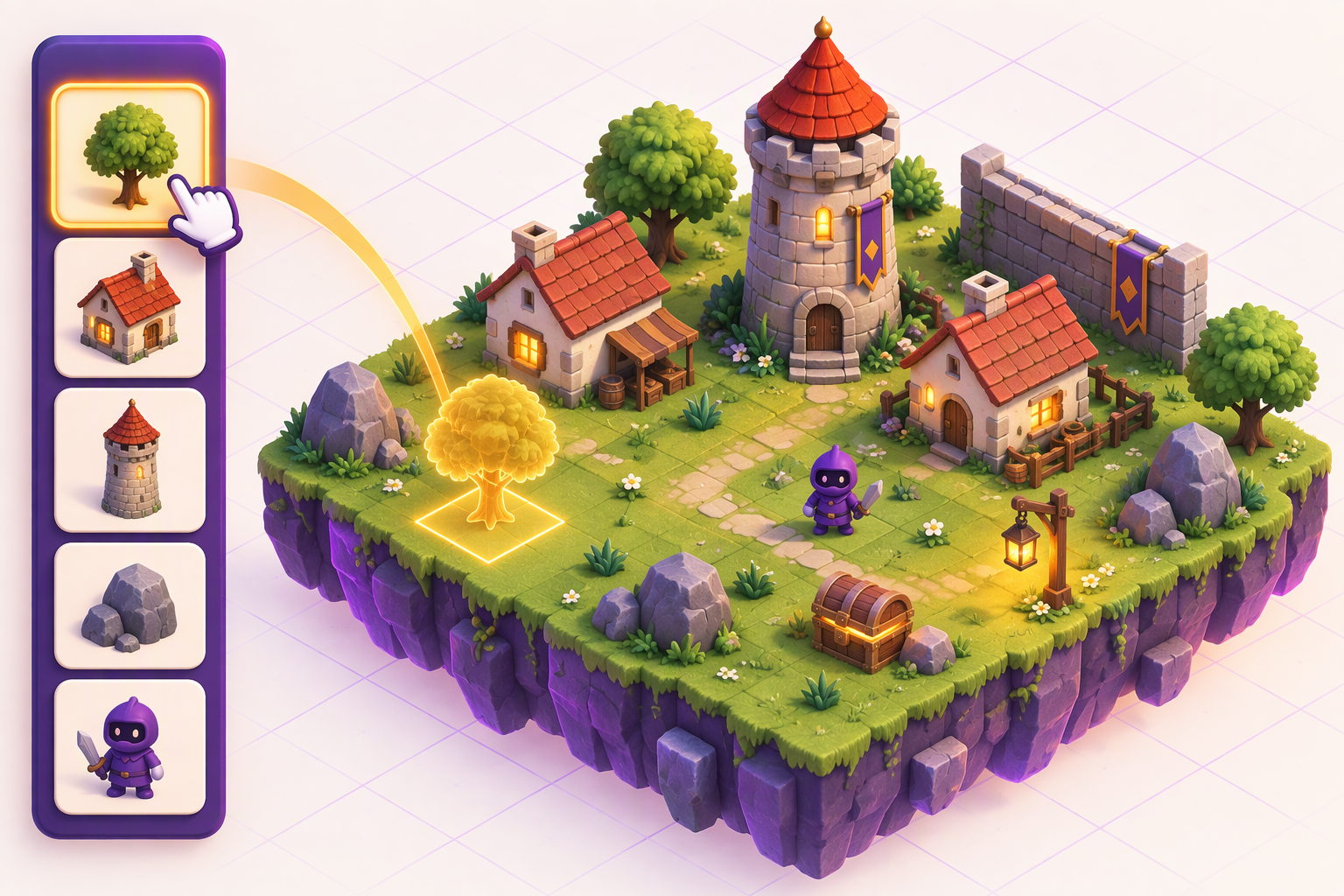
Ilustración del taller: una estantería de prefabs a la izquierda, una mano arrastrando un árbol hacia una mesa con un nivel medieval, y un fantasma ámbar con resaltado de snap sobre la hierba
Arrastrar y soltar en la mesaDrag and drop on the mesaIlustración generada para este portal (no es captura del programa): arrastras una pieza de la estantería y un fantasma con snap te muestra dónde cae antes de soltar.Illustration generated for this portal (not a program screenshot): you drag a piece from the shelf and a snapping ghost shows where it lands before you drop.
personaje.vrm
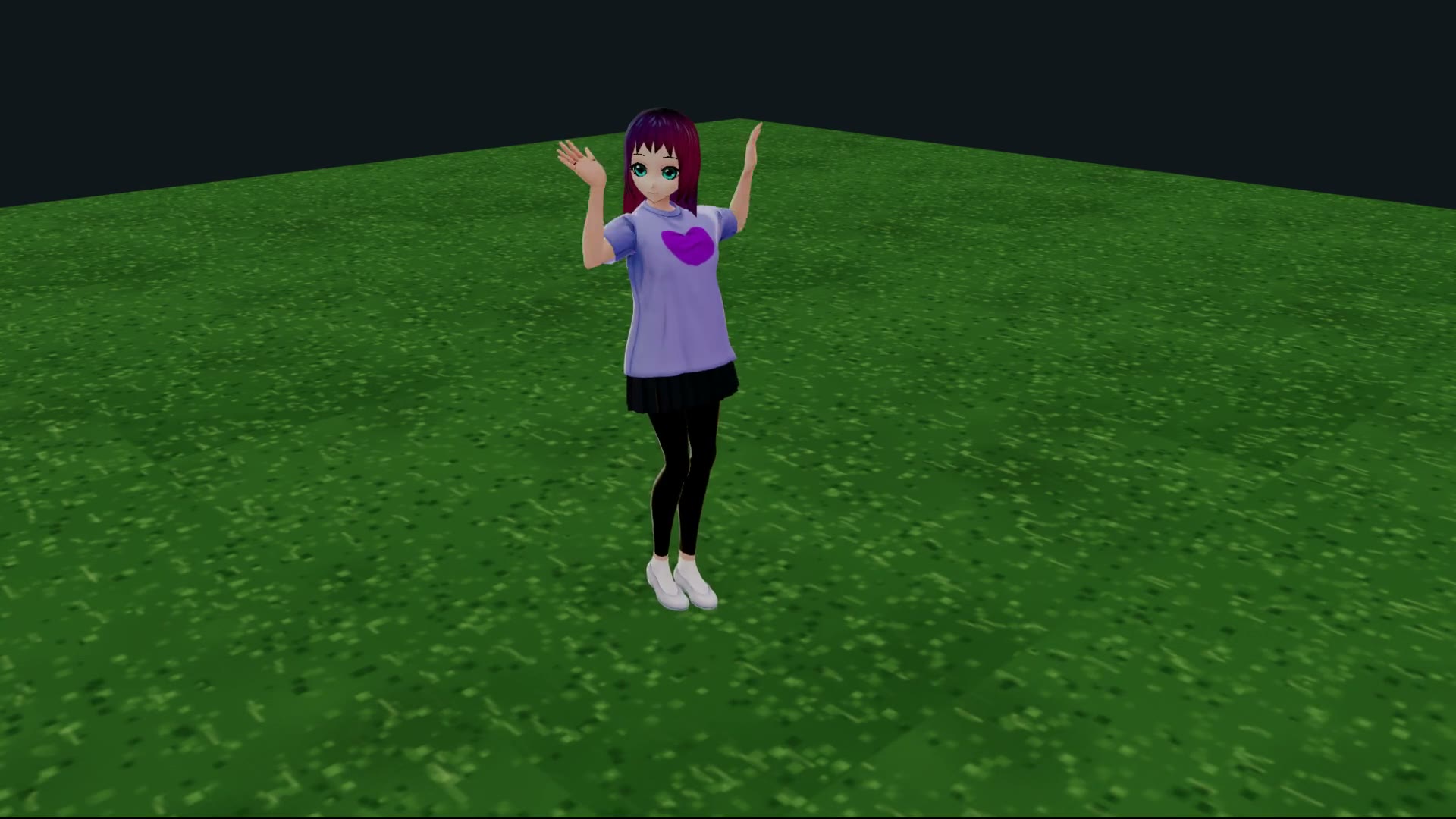
Personaje VRM importado saludando sobre un prado en el editor
Personajes con poseCharacters with a poseCaptura real: un personaje colocado como prefab, con fichas de pose rápidas. Sirve de referencia de escala del nivel (1 unidad = 1 metro).Real screenshot: a character placed as a prefab, with quick pose chips. It doubles as a scale reference for the level (1 unit = 1 meter).
nivel_terminado
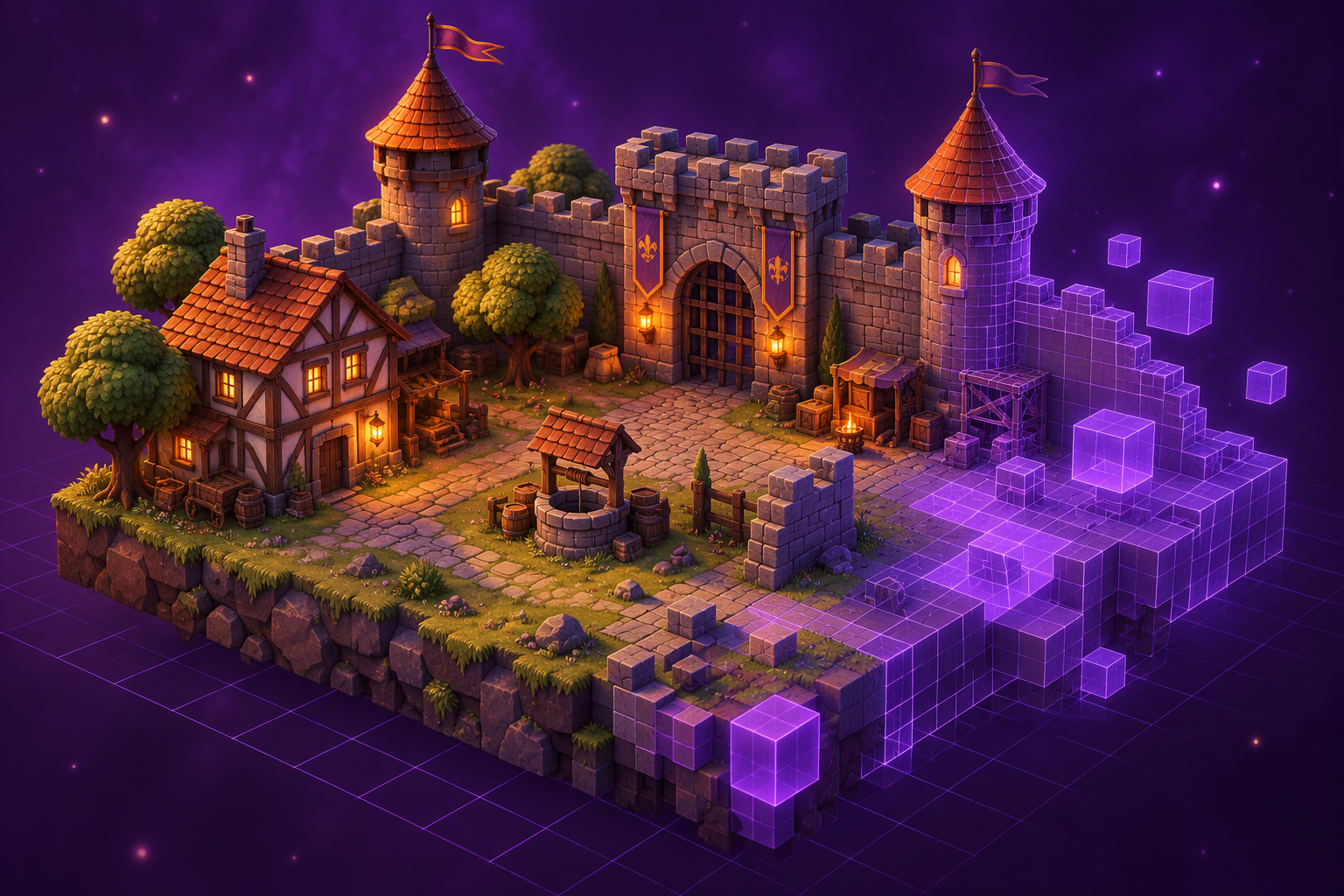
Ilustración de un nivel isométrico con torres, puentes y terreno escalonado en colores púrpura y ámbar
Hasta dónde puedes llegarHow far you can goIlustración generada (no es captura): el tipo de entorno que armas pieza a pieza. En modo avanzado, el editor completo añade gizmos, importación de tus modelos y construcción voxel.Generated illustration (not a screenshot): the kind of environment you assemble piece by piece. In advanced mode, the full editor adds gizmos, model import and voxel building.

05Qué lleva incluido la descargaWhat the download includes

El taller ultrafácil con una librería curada dentro: la estantería de prefabs, las plantillas de un clic, los controles grandes y el exportador. El modo avanzado guarda el editor completo para quien lo quiera. Fuera quedan el cómic, las animaciones de personajes y las voces.The ultra-easy workshop with a curated library inside: the prefab shelf, one-click templates, big controls and the exporter. Advanced mode keeps the full editor for those who want it. Comics, character animations and voices are left out.

331 piezas curadas · 10 mundos331 curated pieces · 10 worlds

Castillo (42), pueblo (38), ciudad (45), calles (25), naturaleza (45), interiores (45), tesoro y taller (46), piezas sueltas (31) y vehículos (9), más 5 personajes VRM. Todo CC0 de Quaternius y Kenney, elegido pieza a pieza: cada modelo se abre, se le valida la textura y se mide su tamaño real antes de entrar.Castle (42), village (38), city (45), streets (25), nature (45), interiors (45), treasure and workshop (46), loose blocks (31) and vehicles (9), plus 5 VRM characters. All CC0 from Quaternius and Kenney, picked piece by piece: every model is opened, texture-checked and measured before it gets in.

GLBCC0331 piezas medidas331 measured pieces

14 plantillas, 4 niveles completos14 templates, 4 full levels

Cuatro niveles completos listos para usar — valle del castillo, puesto del bosque, villa del mercado y campo de asedio — más castillo, plaza, taberna, bosque, sala del trono, mercado, campamento, jardín, atalaya y puente. Cada plantilla muestra una miniatura real de lo que genera, agrupada por familias.Four complete ready-to-use levels — castle valley, forest outpost, market town and siege field — plus castle, square, tavern, forest, throne room, market, camp, garden, watchtower and bridge. Every template shows a real thumbnail of what it generates, grouped by family.

Niveles completosFull levelsMiniaturas realesReal thumbnails5 estilos5 styles

Estantería de prefabsPrefab shelf

Arrastra y suelta piezas de diez familias — castillo, pueblo, ciudad, calles, naturaleza, interiores, tesoro y taller, piezas sueltas, vehículos y personajes — 379 fichas en total, cada una con su medida en metros. Un fantasma con la forma real de la pieza muestra dónde cae, y siempre apoya sobre el suelo o la superficie de abajo: nada queda flotando. En tableta, toca y estampa copias. Guarda tu propia selección como prefab del proyecto.Drag and drop pieces from ten families — castle, village, city, streets, nature, interiors, treasure and workshop, loose blocks, vehicles and characters — 379 cards in all, each one labeled with its size in meters. A ghost in the piece's real shape shows where it lands, and it always rests on the ground or the surface below: nothing floats. On a tablet, tap to stamp copies. Save your own selection as a project prefab.

Arrastrar y soltarDrag & dropSnapSnapTáctilTouch

Importación de modelosModel import

En modo avanzado, trae tus propios GLB, GLTF, FBX y VRM, e imágenes para fondos y proyecciones. La librería incluida es un punto de partida, no un límite.In advanced mode, bring your own GLB, GLTF, FBX and VRM, plus images for backgrounds and projections. The included library is a starting point, not a limit.

GLB · GLTFFBX · VRM

Exportador Tropikal + GLBTropikal exporter + GLB

Paquete tropikal.scene3d.v1 con instanciación por asset, props de diseño, validación de 32/128 MB y avisos honestos. Además GLB suelto, PNG del viewport y JSON del nivel.tropikal.scene3d.v1 package with per-asset instancing, design props, 32/128 MB validation and honest warnings. Plus standalone GLB, viewport PNG and level JSON.

scene3d.v1GLB · PNG · JSON

Pensado para cualquieraMade for anyone

Deshacer y rehacer grandes, doble clic para borrar, flechas para mover al detalle, fichas de pose para personajes y objetivos táctiles grandes para tableta. Un botón «Avanzado» abre el editor completo con gizmos, luces y ambientes; «Modo fácil» te devuelve a la mesa.Big undo and redo, double-click to delete, arrow keys to nudge, pose chips for characters and large touch targets for tablets. An “Advanced” button opens the full editor with gizmos, lights and moods; “Easy mode” brings you back to the mesa.

Deshacer / rehacerUndo / redoTabletaTabletModo fácilEasy mode

06PrecioPricing

GRATISFREE

Versión completa, sin límite de tiempo.Full version, no time limit.

Sin tarjetas de pago, sin cuentas, sin suscripciones y sin licencia que activar. Descarga el programa y úsalo con todas sus funciones de construcción y exportación. El proyecto sigue en desarrollo abierto (alfa): guarda tu trabajo con frecuencia.No credit cards, no accounts, no subscriptions, no license to activate. Download the program and use every building and export feature. The project remains in open development (alpha): save your work often.

Sin registroNo sign-up Sin límite de tiempoNo time limit Sin marca de aguaNo watermark Modelos CC0 incluidosCC0 models included Proyectos tuyos, en tu equipoYour projects, on your machine

07Descargar Designer3DDownload Designer3D

Compilado desde el estado actual del proyecto: el taller ultrafácil de niveles con el mismo motor que ComicStudio. Funciona y es completo; al estar en alfa puede haber botones que cambien de sitio y errores por descubrir.Compiled from the project's current state: the ultra-easy level workshop on the same engine as ComicStudio. It works and it is complete; being alpha, buttons may move and bugs may surface.

  • Dos formas de traerlo: el ZIP portable (descomprime y ejecuta Designer3D.exe, no se instala nada) o el instalador .exe (Program Files, acceso directo y desinstalador).Two ways to get it: the portable ZIP (unzip and run Designer3D.exe, nothing gets installed) or the installer .exe (Program Files, desktop shortcut and uninstaller).
  • Trae dentro del paquete la librería curada de construcción: 379 fichas CC0, sin descargas adicionales.The curated building library ships inside the package: 379 CC0 pieces, no extra downloads.
  • Windows 10 u 11 de 64 bits, GPU compatible con DirectX 11 y 8 GB de RAM como mínimo (16 GB y SSD recomendados para escenarios grandes).64-bit Windows 10 or 11, a DirectX 11 capable GPU and at least 8 GB of RAM (16 GB and SSD recommended for big scenes).
  • Necesita el .NET Desktop Runtime 8 y el WebView2 Runtime de Microsoft. Si ya tienes Edge actualizado, WebView2 ya está instalado.Requires the .NET Desktop Runtime 8 and Microsoft's WebView2 Runtime. If Edge is up to date, WebView2 is already there.
  • Los proyectos se guardan en la carpeta que elijas, como archivos normales: llévatelos de un equipo a otro.Projects save to the folder you choose as plain files: carry them between machines.
Windows puede avisarte antes de abrirlo.Windows may warn you before opening it. El ejecutable todavía no tiene certificado de firma digital: aparece el aviso «no es común que se ejecute esta aplicación». Pulsa en Más información y luego en Ejecutar de todos modos. Es normal en esta fase y no cambia nada del funcionamiento. The executable is not code-signed yet, so SmartScreen shows its «this app isn't commonly run» notice. Click More info then Run anyway. Normal at this stage; it changes nothing about how the app works.

08Preguntas frecuentesFrequently asked questions

Lo esencial antes de descargar.The essentials before downloading.

¿De verdad es gratis y sin límite de tiempo?Is it really free with no time limit?

Sí. Esta es la versión completa del estado actual del proyecto: no caduca, no pide registro, licencia ni clave, y no recorta funciones de construcción ni de exportación. La descarga y el uso no cuestan nada.Yes. This is the full version of the project's current state: it never expires, asks for no sign-up, license or key, and cuts no building or export features. Downloading and using it costs nothing.

¿En qué se diferencia de ComicStudio?How is it different from ComicStudio?

Designer3D es el mismo motor convertido en un taller ultrafácil de niveles: mesa con terreno, estantería de prefabs que se arrastran y sueltan, plantillas de un clic, controles grandes y exportación a Tropikal con un botón. El modo avanzado guarda el editor completo (gizmos, importación, luces). Fuera quedan el flujo de cómic, el timeline, las animaciones de personajes Mixamo, las voces y el reproductor web. Si quieres cómics 3D y vídeo animado, usa ComicStudio.Designer3D is the same engine turned into an ultra-easy level workshop: a mesa with terrain, a drag-and-drop prefab shelf, one-click templates, big controls and one-button export to Tropikal. Advanced mode keeps the full editor (gizmos, import, lights). The comic workflow, the timeline, Mixamo character animations, voices and the web player are left out. If you want 3D comics and animated video, use ComicStudio.

¿De verdad lo puede usar cualquiera, incluso un niño?Can anyone really use it, even a child?

Ese es el objetivo. No hay que aprender menús ni modos: arrastras una pieza de la estantería a la mesa y ya está; en tableta, tocas la pieza y tocas la mesa. Un fantasma te enseña dónde va a caer antes de soltar, deshacer es un botón grande y borrar es doble clic. Las plantillas arman un nivel entero de un clic para empezar sin miedo.That is the goal. There are no menus or modes to learn: drag a piece from the shelf onto the mesa and done; on a tablet, tap the piece and tap the mesa. A ghost shows where it will land before you drop, undo is one big button and delete is a double-click. Templates build a whole level in one click so you can start without fear.

¿Qué significa que esté en alfa?What does alpha mean?

Que el programa ya hace todo lo que promete esta página, pero aún le falta pulido: habrá botones que se muevan, opciones que cambien de nombre y errores por descubrir. Guarda tu trabajo con frecuencia y no dejes la única copia dentro del equipo.The program already does everything this page promises, but it still needs polish: buttons may move, options may be renamed and bugs may surface. Save often and don't keep the only copy on one machine.

¿Necesito internet?Do I need internet?

Para trabajar, no: el editor y la librería van dentro del paquete. Solo lo necesitas la primera vez si tu Windows no tiene el .NET Desktop Runtime 8 o el WebView2.Not for working: the editor and library ship inside the package. You only need it the first time if your Windows lacks the .NET Desktop Runtime 8 or WebView2.

¿Windows me va a bloquear el ejecutable?Will Windows block the executable?

Casi seguro verás el aviso de SmartScreen, porque el binario todavía no está firmado con certificado. Pulsa «Más información» y «Ejecutar de todos modos». La firma llegará con la versión estable.You will almost certainly see SmartScreen's notice because the binary is not code-signed yet. Click “More info” and “Run anyway”. Signing will come with the stable release.

¿Puedo usar mis propios modelos?Can I use my own models?

Sí, en modo avanzado: se importan GLB, GLTF, FBX y VRM, y también tus imágenes para fondos y proyecciones. La librería incluida (modelos CC0 de Quaternius y Kenney, más piezas propias) es un punto de partida, no un límite.Yes, in advanced mode: GLB, GLTF, FBX and VRM import, plus your images for backgrounds and projections. The included library (CC0 Quaternius models and original pieces) is a starting point, not a limit.

¿Qué formatos exporta y qué límites tiene el paquete Tropikal?Which formats does it export and what are the Tropikal package limits?

GLB/GLTF, PNG del viewport, JSON del nivel y el ZIP tropikal.scene3d.v1 (escena.json + assets/*.glb). El importador de Tropikal Studio acepta 32 MB por archivo y 128 MB por paquete; el exportador valida esos límites y avisa si conviene exportar por zonas. Las animaciones, si el asset las trae, viajan como clips con nombre dentro del GLB.GLB/GLTF, viewport PNG, level JSON and the tropikal.scene3d.v1 ZIP (escena.json + assets/*.glb). Tropikal Studio's importer accepts 32 MB per file and 128 MB per package; the exporter validates those limits and warns when exporting by zones makes sense. Animations, if the asset has them, travel as named clips inside the GLB.

¿Cómo aviso de un fallo o propongo un cambio?How do I report a bug or suggest a change?

Por correo a [email protected]. Sirve de mucho decir qué escena estabas usando, qué pasos seguiste y qué salió mal.Email [email protected]. It helps a lot to say which scene you were using, the steps you followed and what went wrong.