 TROPIKALSTUDIO
TROPIKAL STUDIO

Describa su idea. Diseñe apps y juegos con ayuda de IA. Entregue el diseño completo para implementarlo. Describe your idea. Design apps and games with AI assistance. Hand off the complete design for implementation.
0.1.24 · Más niveles listos para usar y una galería que solo muestra niveles de verdad0.1.24 · More ready-to-use levels and a gallery that only shows real levels
La galería de niveles de GAMES se amplía con seis escenarios curados: mazmorra cenital con salas y pasillos, carrera infinita con obstáculos y monedas, sigilo con guardias y conos de visión, pueblo con plaza y NPCs, arena de jefe con barra de vida y laberinto con llave y meta. Cada uno se siembra como documento editable con todos sus elementos ya colocados y sus reglas descritas como especificaciones, no lógica ejecutable. Además, la galería depura lo que muestra: los kits de interfaz (HUD, pausa, menús, controles) dejan de aparecer como si fueran escenarios, de modo que lo que usted elige es siempre un nivel de partida. El manual documenta los escenarios.The GAMES level gallery grows with six curated scenes: a top-down dungeon with rooms and corridors, an endless runner with obstacles and coins, a stealth level with guards and vision cones, a town with a plaza and NPCs, a boss arena with a health bar and a maze with a key and a goal. Each one is seeded as an editable document with all its elements already placed and its rules described as specifications, not executable logic. The gallery also cleans up what it shows: interface kits (HUD, pause, menus, controls) no longer appear as if they were scenes, so what you pick is always a starting level. The manual documents scenes.
0.1.23 · Galería de niveles: crear un escenario de GAMES abre niveles listos para usar, no un lienzo vacío0.1.23 · Level gallery: creating a GAMES scene opens ready-to-use levels, not an empty canvas
Al crear un escenario 2D en GAMES —desde el menú, el explorador o el botón +— se abre una galería de niveles embarcados: kit de jugador, nivel de plataformas, arena cenital, oleada de enemigos, circuito de carreras y más, agrupados por familia y con buscador. Un clic en «Usar este nivel» siembra la composición como documento editable con todos sus elementos ya colocados (un changeset real que se deshace con Ctrl+Z), y usted la ajusta a su gusto; «Empezar en blanco» queda como opción secundaria. Es el camino rápido para quien consume lo que el programa trae: partir de un nivel hecho y ajustarlo, en vez de dibujar desde cero. Las reglas descritas son especificaciones editables, no lógica ejecutable. El manual documenta los escenarios.Creating a 2D scene in GAMES —from the menu, the explorer or the + button— opens a gallery of bundled levels: player kit, platformer level, top-down arena, enemy wave, racing circuit and more, grouped by family with a search box. One click on “Use this level” seeds the composition as an editable document with all its elements already placed (a real changeset you can undo with Ctrl+Z), and you tune it to taste; “Start blank” remains a secondary option. It is the fast path for those who consume what the program ships: start from a ready-made level and adjust it, instead of drawing from zero. Described rules are editable specifications, not executable logic. The manual documents scenes.
0.1.22 · Entrega en HTML autocontenido: una web autodocumentada con su diseño, para una IA o para construirlo usted mismo0.1.22 · Self-contained HTML handoff: a self-documented web with your design, for an AI or to build yourself
En Entregar diseño, el botón principal «Exportar HTML autocontenido» produce un solo archivo .html que es una web autodocumentada: conserva el modelo semántico completo como isla JSON, los recursos embebidos, el informe de diseño y la guía para la IA externa. Además suma una guía para construirlo manualmente que se adapta a la tecnología declarada (Godot, Unity, Phaser, framework web, Flutter o HTML/JS): mapea escenas, elementos, relaciones y estados a los conceptos de su herramienta y le da primeros pasos, sin sustituir su documentación oficial. El ZIP de diseño editable se conserva como alternativa. Sirve tanto para encargar el proyecto a una IA como para que un desarrollador lo construya a mano con un norte claro. El manual documenta la entrega.In Deliver design, the primary button “Export self-contained HTML” produces a single .html file that is a self-documented web: it preserves the full semantic model as a JSON island, the embedded assets, the design report and the guide for the external AI. It also adds a guide to build it manually that adapts to the declared technology (Godot, Unity, Phaser, web framework, Flutter or HTML/JS): it maps scenes, elements, relations and states to your tool's concepts and gives first steps, without replacing its official documentation. The editable design ZIP remains as an alternative. It serves both to hand the project to an AI and for a developer to build it by hand with a clear north. The manual documents the handoff.
0.1.21 · El borrador con IA ya se crea de verdad: parta de una idea o de un informe de investigación0.1.21 · The AI draft now really gets created: start from an idea or a research report
Al crear un proyecto con «Borrador con IA», la IA genera los documentos visuales y la ficha «Borrador inicial» paso a paso, con alcance corto (2–4 pantallas del recorrido principal) o completo (hasta 16 pantallas). Puede partir de una idea inicial o de un informe de investigación en .md/.txt que se pega o se carga como archivo: el informe queda como especificación del proyecto antes que cualquier IA y activa el alcance completo. Sin proveedor configurado, el proyecto se crea igual con su idea o informe como especificación pendiente de IA, y el botón «Usar la clave del Tropikal anterior» importa la configuración legacy de un clic. La tecnología de GAMES inicia vacía para que usted la elija; APPS conserva Web. Se corrigió el arranque que no creaba nada con modelos de razonamiento (se desactiva el razonamiento interno para que el presupuesto de tokens vaya al diseño) y se reconcilian las referencias rotas cuando el proveedor corta la respuesta. El manual documenta el borrador y el informe.When you create a project with “AI draft”, the AI generates the visual documents and the “Initial draft” spec step by step, with short scope (2–4 screens of the main flow) or full (up to 16 screens). You can start from an initial idea or from a research report in .md/.txt that you paste or load as a file: the report becomes the project specification before any AI and activates full scope. With no provider configured, the project is still created with your idea or report as a specification pending AI, and the “Use the previous Tropikal key” button imports the legacy configuration in one click. The GAMES technology starts empty for you to choose; APPS keeps Web. We fixed the kickoff that created nothing with reasoning models (internal reasoning is disabled so the token budget goes to the design) and broken references are reconciled when the provider cuts the response. The manual documents the draft and the report.
0.1.20 · Diez proveedores de IA con asesoría: elija modelo sabiendo qué esperar0.1.20 · Ten AI providers with guidance: pick a model knowing what to expect
Conectar su IA deja de ser un formulario técnico. Google Gemini, Zhipu GLM, Moonshot/Kimi y SiliconFlow se suman a OpenAI, Anthropic, DeepSeek, Qwen y OpenRouter: diez proveedores, cada uno con una explicación llana de para qué destaca y la liga «Obtener clave» a su consola. Al elegir el modelo activo, las etiquetas Recomendado, Económico y Ve imágenes le dicen qué esperar, con una nota de para qué sirve; los modelos escritos a mano se respetan con aviso honesto de cómo se detecta su visión. Sin proveedor activo, una guía de cuatro pasos le lleva de cero a conectado, y «Comprobar clave y catálogo» valida su clave sin gastar tokens de respuesta. El manual documenta el catálogo y la asesoría.Connecting your AI stops being a technical form. Google Gemini, Zhipu GLM, Moonshot/Kimi and SiliconFlow join OpenAI, Anthropic, DeepSeek, Qwen and OpenRouter: ten providers, each with a plain-language note on what it is good at and a “Get API key” link to its console. When you pick the active model, the Recommended, Budget and Sees images tags tell you what to expect, with a note on what it is for; hand-typed models are respected with an honest notice on how their vision is detected. With no active provider, a four-step guide takes you from zero to connected, and “Check key and catalog” validates your key without spending response tokens. The manual documents the catalog and the guidance.
0.1.19 · El chat ve su proyecto: adjuntos, contexto clicable y una IA que pregunta antes de adivinar0.1.19 · The chat sees your project: attachments, clickable context and an AI that asks before guessing
El asistente de IA da el primer paso del pivote hacia el diseño conversacional. Sobre el cuadro de texto, las fichas de contexto muestran el proyecto, el documento abierto y su selección, y al pulsarlas le llevan al objeto: seleccionar es darle contexto a la IA sin explicárselo. Puede adjuntar imágenes con el botón 📎 o arrastrándolas al cuadro (hasta 6 por mensaje): se importan al proyecto y la IA las usa como referencia visual para colocar y ajustar piezas con esos gráficos. Si el modelo activo no procesa imágenes, se le avisa con claridad y los adjuntos se citan por nombre y ruta, nunca en silencio. La IA conoce además el inventario completo de objetos del proyecto, aunque no estén seleccionados, y cuando falta información esencial devuelve preguntas con opciones en lugar de inventar cambios: usted responde —o deja en blanco y ella decide— y la propuesta llega después con el mismo contexto. Cada error se muestra con mensaje claro y siguiente paso. El manual documenta las tres novedades en la sección del asistente.The AI assistant takes the first step of the pivot toward conversational design. Above the text box, context chips show the project, the open document and your selection, and pressing them takes you to the object: selecting is giving the AI context without explaining it. You can attach images with the 📎 button or by dragging them onto the box (up to 6 per message): they are imported into the project and the AI uses them as visual reference to place and tune pieces with those graphics. If the active model cannot process images, you are clearly told and the attachments are cited by name and path, never in silence. The AI also knows the project's full object inventory, even when nothing is selected, and when essential information is missing it returns questions with options instead of inventing changes: you answer —or leave blank and it decides— and the proposal arrives afterwards with the same context. Every error is shown with a clear message and a next step. The manual documents the three additions in the assistant section.
0.1.18 · Escenarios 3D: importe, vea y ajuste sus niveles en tres dimensiones0.1.18 · 3D scenes: import, view and tune your levels in three dimensions
El estudio GAMES suma escenarios 3D. Importe un ZIP o una carpeta con el formato tropikal.scene3d.v1 —un escena.json con cámara, luces y objetos, más modelos GLB con texturas embebidas— y el nivel se abre en un visor 3D real: orbite con el ratón, acerque con la rueda y haga clic sobre cualquier objeto para seleccionarlo. El inspector muestra y edita nombre, posición en metros, rotación en grados, escala, visibilidad, el clip de animación con bucle y propiedades libres de diseño (por ejemplo «colisión» o «tipo»); cada cambio es un paso que se deshace con Ctrl+Z. Los modelos repetidos se guardan una sola vez por su huella sha256, y el paquete de entrega viaja con el manifiesto, los GLB y un HANDOFF que le explica el contrato completo a la IA que implementará el juego. Es un visor, no un editor de geometría: el diseño 3D se trae de fuera y se ajusta aquí. El manual suma la sección «Escenarios 3D» con las reglas del formato.The GAMES studio adds 3D scenes. Import a ZIP or folder in the tropikal.scene3d.v1 format —an escena.json with camera, lights and objects, plus GLB models with embedded textures— and the level opens in a real 3D viewer: orbit with the mouse, zoom with the wheel and click any object to select it. The inspector shows and edits name, position in meters, rotation in degrees, scale, visibility, the animation clip with loop and free design properties (for example “collision” or “type”); every change is an undoable step with Ctrl+Z. Repeated models are stored only once by their sha256 fingerprint, and the delivery package travels with the manifest, the GLBs and a HANDOFF that explains the full contract to the AI that will implement the game. It is a viewer, not a geometry editor: 3D design is brought in from outside and tuned here. The manual adds the “3D scenes” section with the format rules.
0.1.17 · Kits gráficos con un solo camino: importar, recortar, clasificar y usar0.1.17 · Graphics kits with a single path: import, cut, classify and use
El panel de kits se reordena como un camino de cuatro pasos visibles: 1 Importar → 2 Recortar → 3 Clasificar → 4 Usar y entregar. La canasta desaparece como concepto intermedio: las piezas recortadas se arrastran directamente al lienzo (pantallas y escenarios) y su exportación en PNG numerados con piezas.json vive ahora dentro de Entregar diseño. La clasificación local con CLIP gana precisión —un muro de ladrillos se reconoce como terreno, no como jugador— y trabajo: el botón «Aplicar todas las seguras» escribe de una pasada todas las sugerencias con confianza suficiente, y solo las dudosas quedan para revisión manual. El editor de recorte añade zoom (hasta 16×), ajuste fino del rectángulo con tiradores y campos numéricos en píxeles, y el PNG de la pieza se regenera al guardar. Además, la IA con clave ahora ve sus recortes en el inventario del paquete y los prefiere a las láminas completas al proponer diseños.The kits panel is reorganized as a visible four-step path: 1 Import → 2 Cut → 3 Classify → 4 Use and deliver. The basket disappears as an intermediate concept: cropped pieces drag straight onto the canvas (screens and scenes) and their export as numbered PNGs with piezas.json now lives inside Deliver design. Local CLIP classification gains accuracy —a brick wall is recognized as terrain, not as a player— and leverage: the “Apply all confident” button writes every sufficiently confident suggestion in one pass, leaving only the unsure ones for manual review. The cut editor adds zoom (up to 16×), fine rectangle adjustment with handles and numeric pixel fields, and the piece PNG regenerates on save. Also, the key-based AI now sees your cuts in the package inventory and prefers them over whole sheets when proposing designs.
0.1.16 · 120 destinos y su proyecto arranca con un borrador de IA0.1.16 · 120 targets and your project starts with an AI draft
El campo «Tecnología / destino» del nuevo proyecto es ahora un catálogo de 120 destinos en 10 familias (87 para aplicaciones y 37 para juegos): web, móvil, escritorio, backend, datos, motores 2D y 3D, simulación y plataformas emergentes. Se busca escribiendo, se agrupa por familia, recuerda sus elecciones recientes y sigue aceptando cualquier tecnología escrita a mano. El catálogo viaja con la aplicación y se refresca solo desde este portal cuando publicamos uno nuevo. Y al crear el proyecto puede elegir «Borrador con IA»: escriba su idea en una o dos frases y la IA genera el arranque —entre 2 y 4 documentos visuales con contenido verosímil— tomando como referencia la plantilla de arranque más afín (puede cambiarla a mano). El borrador se aplica paso a paso a la vista, se puede cancelar en cualquier momento y deja la ficha «Borrador inicial» con su idea, la base usada y lo que hizo la IA. Si falla, el proyecto queda creado y vacío: se reintenta, se siembra una plantilla manual o se sigue desde cero, sin perder nada. Esta función usa su proveedor de IA configurado con clave; la IA local integrada clasifica imágenes, pero no genera diseños.The “Technology / target” field of the new-project wizard is now a catalog of 120 targets in 10 families (87 for applications and 37 for games): web, mobile, desktop, backend, data, 2D and 3D engines, simulation and emerging platforms. It searches as you type, groups by family, remembers your recent picks and still accepts any hand-typed technology. The catalog ships with the application and refreshes itself from this portal whenever we publish a new one. And when creating the project you can pick “AI draft”: write your idea in one or two sentences and the AI generates the kickoff —2 to 4 visual documents with believable content— using the closest starter template as a reference (you can override it by hand). The draft is applied step by step in plain sight, can be cancelled at any moment and leaves an “Initial draft” spec recording your idea, the base used and what the AI did. If it fails, the project stays created and empty: retry, seed a manual template or continue from scratch, losing nothing. This feature uses your configured AI provider with its key; the embedded local AI classifies images but does not generate designs.
0.1.15 · Revise a ojo lo que clasifica la IA local0.1.15 · Review by eye what the local AI classifies
Cada sugerencia de la IA local (CLIP) llega ahora con la imagen real de la pieza o del recorte a la vista y su confianza en semáforo: rojo por debajo de 35 %, ámbar hasta 60 %, verde desde 60 %. Usted decide pieza por pieza: Aplicar escribe el tipo o la función, Rechazar descarta la sugerencia sin tocar el kit, el selector reclasifica a mano con todo el catálogo, y Recortar abre el editor de recortes enfocado en esa pieza. Las filas quedan marcadas Pendiente, Aplicada o Rechazada y se filtran por estado con contadores; nada se escribe hasta pulsar Aplicar, y tras recortar la miniatura se refresca con los píxeles nuevos.Every local-AI (CLIP) suggestion now arrives with the real image of the piece or cut in view and its confidence as a traffic light: red below 35%, amber up to 60%, green from 60%. You decide piece by piece: Apply writes the type or role, Reject discards the suggestion without touching the kit, the selector reclassifies by hand against the full catalog, and Re-cut opens the cut editor focused on that piece. Rows are marked Pending, Applied or Rejected and filter by state with counters; nothing is written until you press Apply, and after re-cutting the thumbnail refreshes with the new pixels.
0.1.14 · IA local para sus kits gráficos0.1.14 · Local AI for your graphics kits
El estudio ahora clasifica sus imágenes y recortes en su propio equipo con CLIP: sin internet ni claves. El modelo (~150 MB) se descarga una sola vez y queda guardado; cada resultado muestra su confianza en % y un botón Aplicar escribe el tipo o la función en la pieza. «Sugerir tipo con IA local» también vive dentro de Recortar piezas. Las funciones de IA que sí requieren clave y créditos del proveedor quedan plegadas y marcadas como opcionales, separadas de la IA local. Además: la bienvenida paso a paso permite cambiar el idioma es/en dentro del diálogo, Ayuda → Guía rápida queda vinculada a las tarjetas de guía, y Acerca de acredita el programa a TropikalStudio.The studio now classifies your images and cuts on your own machine with CLIP: no internet, no keys. The model (~150 MB) downloads once and stays; each result shows its confidence in % and an Apply button writes the type or role into the piece. “Suggest type with local AI” also lives inside Cut pieces. AI features that do require a provider key and credits are folded and marked optional, separate from local AI. Also: the step-by-step welcome lets you switch es/en inside the dialog, Help → Quick guide is linked to the guide cards, and About credits the program to TropikalStudio.
0.1.13 · Bienvenida paso a paso y manual completo0.1.13 · Step-by-step welcome and full manual
Una bienvenida paso a paso explica el estudio en cinco pantallas al primer arranque: puede ocultarla para siempre o reabrirla desde Ayuda → Bienvenida paso a paso. Y hay manual completo en este sitio: Ayuda, buscable, en español e inglés, con enlaces que la aplicación abre en la sección exacta (kits, entrega, IA…); los paneles de Kits, Asistente y Entrega llevan su botón de ayuda contextual. Al actualizar con el instalador, los accesos del menú Inicio quedan bajo el nombre TROPIKAL STUDIO. El estudio no descarga ni instala nada por su cuenta: la edición de Microsoft Store se actualizará sola y las ediciones del portal se renuevan descargando la versión vigente.A five-screen step-by-step welcome explains the studio on first launch: hide it forever or reopen it from Help → Step-by-step welcome. And there is a full manual on this site: Help, searchable, in Spanish and English, with links the application opens at the exact section (kits, delivery, AI…); the Kits, Assistant and Delivery panels carry their contextual help button. When updating with the installer, Start Menu shortcuts land under the TROPIKAL STUDIO name. The studio does not download or install anything on its own: the Microsoft Store edition will update itself and portal editions renew by downloading the current version.
0.1.12 · Sus gráficos, recortados a mano y listos para la IA0.1.12 · Your graphics, hand-cropped and AI-ready
Importe una carpeta con sus imágenes y recorte cada pieza arrastrando un marco sobre la imagen real: sin coordenadas adivinadas ni reescalado. Cada pieza se clasifica en lenguaje llano (personaje, enemigo, objeto, fondo, interfaz…) y puede llevar una animación definida por fotogramas: el estudio extrae los PNG de cada fotograma del spritesheet y los comprueba píxel a píxel. Las animaciones aceptan tiras horizontales, verticales y spritesheets en cuadrícula con columnas y separación entre celdas, y el importador admite también AVIF. Las piezas se editan, se borran (con limpieza de sus PNG) y se colocan en el lienzo con su tipo y metadata. La canasta de entrega junta imágenes completas y piezas recortadas y exporta una carpeta con los PNG numerados y un piezas.json que la IA final lee sin adivinar; el paquete de diseño incluye los recortes y la importación de vuelta conserva posiciones y tipos. El producto pasa a llamarse TROPIKAL STUDIO en toda la aplicación, el instalador y el portal. Además, al reabrir o recargar el estudio se recupera la carpeta del proyecto: los kits, los recursos y la entrega vuelven a funcionar sin volver a abrir el proyecto a mano.Import a folder with your images and crop each piece by dragging a frame over the real image: no guessed coordinates, no rescaling. Every piece is classified in plain language (character, enemy, object, background, interface…) and can carry a frame-based animation: the studio extracts each spritesheet frame as PNG and checks them pixel by pixel. Animations accept horizontal strips, vertical strips and grid spritesheets with columns and spacing between cells, and the importer also accepts AVIF. Pieces can be edited, deleted (with their PNGs cleaned up) and placed on the canvas with their type and metadata. The delivery basket gathers whole images and cropped pieces and exports a folder with numbered PNGs and a piezas.json the final AI reads without guessing; the design package includes the cuts and round-trip import preserves positions and types. The product is now named TROPIKAL STUDIO across the app, the installer and the portal. Also, reopening or reloading the studio now restores the project folder: kits, assets and delivery work again without reopening the project by hand.
0.1.11 · Kits, movimientos y edición más rápida0.1.11 · Kits, motion and faster editing
Los comportamientos típicos ya no hay que escribirlos ni pedirlos a la IA cada vez: el panel «Kits de comportamiento» trae 28 kits en 9 familias (enemigos, jugador, objetos, zonas, HUD, botones, navegación, formularios y datos) que se aplican al objeto seleccionado con un clic y se deshacen con Ctrl+Z. Cada objeto puede declarar un movimiento de ejemplo —ida y vuelta, círculo, órbita alrededor de otro objeto o ruta por puntos— y la vista previa lo anima con guías discontinuas; el HTML exportado incluye la misma animación y la IA final recibe los parámetros. Editar se acelera: Ctrl+arrastrar clona el objeto en el sitio, un tirador visual rota directamente en el lienzo y el botón ⛶ encuadra el nivel completo. La ficha del objeto ahora se reedita (rellena los campos al volver a abrirla), tiene modo paso a paso y plantillas de definición según el tipo de proyecto. El wizard de arranque ofrece un catálogo amplio de tecnologías con texto libre; las ideas de la IA traen botones Usar / Ajustar / Copiar; cada problema de la lista lleva al lugar exacto donde se arregla; y un diagrama draw.io puede entregarse a la IA, que pregunta lo que necesite antes de proponer cambios. El idioma es/en se cambia desde la barra superior.Typical behaviors no longer need to be written or requested from the AI every time: the “Behavior kits” panel ships 28 kits in 9 families (enemies, player, objects, zones, HUD, buttons, navigation, forms and data) applied to the selected object with one click and undoable with Ctrl+Z. Every object can declare an illustrative motion —ping-pong, circle, orbit around another object or a point path— and the preview animates it with dashed guides; the exported HTML includes the same animation and the final AI receives the parameters. Editing gets faster: Ctrl+drag clones the object in place, a visual handle rotates right on the canvas and the ⛶ button frames the whole level. The object sheet is now re-editable (fields refill when reopened), has a step-by-step mode and definition templates per project type. The startup wizard offers a broad technology catalog with free text; AI ideas carry Use / Adjust / Copy buttons; each issue in the list jumps to the exact place where it is fixed; and a draw.io diagram can be handed to the AI, which asks what it needs before proposing changes. Language es/en switches from the top toolbar.
0.1.10 · Más simple, mismo poder0.1.10 · Simpler, same power
Esta versión reduce lo que hay que entender sin quitar nada de lo que se puede hacer. El panel inferior queda en tres pestañas: Problemas (una sola lista con filtro de errores y avisos), Actividad e Historial. Los ajustes secundarios del lienzo —cuadrícula, tamaño y capas— se agrupan en un botón «Ajustes del lienzo»; la barra diaria deja zoom, snap, guías y vista previa. Las pestañas y etiquetas pasan a lenguaje llano: Proyecto, Piezas, Composiciones, Propiedades, Conexiones, Origen (Tú / IA). Inicio y el menú Ayuda muestran una guía de tres pasos —describe tu idea, diseña y revisa, entrega a tu IA— y cada paso lleva a su herramienta. El inspector de propiedades se activa solo al seleccionar un objeto, y la barra de estado sustuye el contador de tokens por un aviso de uso de IA al pasar el ratón.This release reduces what you need to understand without removing anything you can do. The bottom panel becomes three tabs: Problems (one list with an errors/warnings filter), Activity and History. Secondary canvas settings —grid, size and layers— are grouped under one “Canvas settings” button; the daily bar keeps zoom, snap, guides and preview. Tabs and labels switch to plain language: Project, Parts, Compositions, Properties, Connections, Origin (You / AI). Start and the Help menu show a three-step guide —describe your idea, design and review, hand off to your AI— and each step jumps to its tool. The property inspector activates itself when you select an object, and the status bar replaces the token counter with an AI usage note on hover.
0.1.9 · Más claro, más práctico0.1.9 · Clearer, more practical
La barra superior ahora tiene botones con nombre: Validar avisa del resultado con un mensaje, Revisar abre las comprobaciones con preguntas de IA, Entregar lleva directo al paquete para otra IA y IA muestra u oculta el asistente. La lista de problemas ya no se pierde al abrir uno: un navegador flotante permite pasar al anterior o al siguiente y volver a la lista sin revalidar. El asistente muestra qué está haciendo, con fase, segundos transcurridos y botón de detener. El botón derecho sobre un objeto permite definir su comportamiento y convertirlo en otro tipo (por ejemplo, personaje a enemigo), también desde el inspector. Las especificaciones se agrupan por familia y el editor añade formato, vista dividida y una ficha guiada por objeto. La IA varía sus propuestas: los niveles nuevos se diferencian de los existentes en tema, recorrido y mecánica, salvo que usted pida lo contrario.The top toolbar now has labeled buttons: Validate reports the result with a message, Review opens the checks with AI questions, Deliver goes straight to the handoff package for another AI, and AI shows or hides the assistant. The issue list is no longer lost when you open one: a floating navigator moves to the previous or next issue and back to the list without revalidating. The assistant shows what it is doing, with phase, elapsed seconds and a stop button. Right-clicking an object lets you define its behavior and convert it to another type (for example, character to enemy), also from the inspector. Specifications are grouped by family and the editor adds formatting, split view and a guided per-object sheet. AI varies its proposals: new levels differ from existing ones in theme, route and mechanic, unless you ask otherwise.
La IA propone pantallas y funcionamiento narrativo, construye el diseño por pasos y mejora elementos concretos. Ocho nuevas plantillas incluyen aventuras conversacionales con decisiones y finales. Importe kits gráficos, spritesheets, audio y modelos como recursos; revíselos y diseñe con ellos.AI proposes screens and plain-language behavior, builds the design step by step, and refines selected elements. Eight new templates include branching narrative adventures. Import graphics kits, sprite sheets, audio and models as resources, review them and use them in your design.
Arme maquetas con 53 piezas visuales en 10 familias y 43 composiciones en 12 familias, incluido masonry. Personajes, animales, robots, enemigos, vehículos y entornos arrastrables, girables y recoloreables. Prepare prompts para IA externa y hojas cómic o spritesheets con medidas exactas; importe la imagen y recorte sin reescalado. Reordene escenas y pantallas en el explorador arrastrándolas o con Subir/Bajar en el menú contextual; el orden se guarda y se deshace con Ctrl+Z. Refleje objetos en horizontal o vertical desde el inspector: el espejo se ve en el lienzo y en la vista previa, y viaja en el diseño exportado.Build mockups with 53 visual pieces in 10 families and 43 compositions in 12 families, including masonry. Drag, rotate and recolor characters, animals, robots, enemies, vehicles and environments. Prepare external AI prompts and comic or sprite sheets with exact dimensions; import the image and crop without rescaling. Reorder scenes and screens in the explorer by dragging or with Move up/down in the context menu; the order is saved and undoable with Ctrl+Z. Mirror objects horizontally or vertically from the inspector: the flip shows on the canvas and in the preview, and travels with the exported design.
Revise faltantes con preguntas y opciones recomendadas. Exporte un ZIP editable o una carpeta con especificaciones, recursos, licencias e informe HTML imprimible: Ctrl+P permite guardarlo como PDF. Esta etapa diseña; no genera ni ejecuta el juego o la aplicación. La visión depende del modelo configurado; los modelos 3D se conservan como recursos, no se renderizan.Review gaps with questions and recommended choices. Export an editable ZIP or a folder containing specifications, assets, license evidence and a printable HTML report: use Ctrl+P to save as PDF. This stage designs; it does not generate or run the game or app. Vision depends on the selected model; 3D models are preserved as resources, not rendered.
01La filosofía: tú transmites la idea, la IA resuelve la ingenieríaThe philosophy: you convey the idea, AI handles the engineering
Las personas piensan en imágenes, flujos y ejemplos, no en esquemas de base de datos ni en árboles de colisiones. En Tropikal tú dibujas lo que quieres y lo explicas con tus palabras; la IA se encarga de la complejidad técnica: entidades, datos, validaciones, mecánicas, colisiones… Y todo lo que la IA deduce queda marcado como tal, siempre revisable y aprobable por ti. People think in pictures, flows and examples — not database schemas or collision trees. In Tropikal you draw what you want and explain it in your own words; the AI takes care of the technical complexity: entities, data, validations, mechanics, collisions… And everything the AI infers is labeled as such, always reviewable and approvable by you.
02Cómo funcionaHow it works
pantallas, escenas y diagramas (draw.io integrado)You draw
screens, scenes and diagrams (built-in draw.io)
en lenguaje natural qué debe pasarYou explain
in natural language what should happen
entidades, datos, validaciones, mecánicasAI proposes
entities, data, validations, mechanics
procedencia: lo tuyo vs lo deducido por la IAYou review & approve
provenance: yours vs AI-inferred
APPS: web / Flutter / desktop · GAMES: GodotYou build
APPS: web / Flutter / desktop · GAMES: Godot
Manual al día: lo nuevo de la 0.1.24 y la 0.1.25Up-to-date manual: what's new in 0.1.24 and 0.1.25
El manual explica por tareas todo lo que el estudio hace hoy. Estas son las secciones nuevas, con pasos numerados y los nombres exactos de los botones. The manual explains by task everything the studio does today. These are the new sections, with numbered steps and the exact button names.
Inicio y demosHome and demos
Campaña del bosque, Arena neón y Panel de logística: miniaturas, recientes y cómo empezar en dos clics.Forest campaign, Neon arena and Logistics panel: thumbnails, recents and how to start in two clicks.
Probar la maqueta vivaTry the live mockup
Qué simula y qué no, la etiqueta de maqueta y cómo salir con Esc sin tocar el diseño.What it simulates and what it does not, the mockup badge and how to exit with Esc without touching the design.
Paneles y layoutsPanels and layouts
Pin y autoocultar estilo Visual Studio, riel lateral, overlay y los layouts Diseño, Revisar, Chat IA, Nivel y «Mi layout».Visual Studio–style pin and auto-hide, side rail, overlay and the Design, Review, AI chat, Level and “My layout” layouts.
Entregar el diseñoDeliver the design
HTML autocontenido reimportable con historial, carpeta con informe y prototipo jugable con Phaser (D34).Re-importable self-contained HTML with history, folder with report and playable prototype with Phaser (D34).
Biblioteca gráfica globalGlobal graphics library
Importar una vez, insertar como imagen embebida y borrar sin alterar los diseños donde ya se usó.Import once, insert as an embedded image and delete without altering designs where it was already used.
NivelesLevels
Galería de prefabs, packs, generadores con semilla, Tiled .tmx/LDtk, «Nivel desde imagen» y «Diseño de otra IA».Prefab gallery, packs, seeded generators, Tiled .tmx/LDtk, “Level from image” and “Design from another AI”.
IA sin gastar de másAI without overspending
«Validar clave» por tarjeta sin tokens, guías de género, crítica por lentes y «Traer de una IA» con bloque validado.Per-card “Validate key” without tokens, genre guides, lens critique and “Bring from an AI” with a validated block.
SimuladoresSimulators
La categoría del wizard con la plantilla Estación de vehículos y el catálogo de 115 destinos.The wizard category with the Vehicle station template and the 115-target catalog.
03Dos estudios especializados, un mismo IDETwo specialized studios, one IDE
Elige el estudio según lo que quieres crear. Cada uno aporta sus propias herramientas, plantillas y conocimientos de IA especializados. Pick the studio that matches what you want to create. Each one brings its own tools, templates and specialized AI knowledge.
APPS
ESTUDIO DE APLICACIONESAPPLICATION STUDIO
- Diseño visual de pantallas, formularios y dashboards.Visual design of screens, forms and dashboards.
- Modelo de datos y validaciones derivado de tu diseño.Data model and validations derived from your design.
- Diagramas de procesos y lógica con draw.io integrado.Process and logic diagrams with built-in draw.io.
- Destinos: web, Flutter (móvil) y escritorio.Targets: web, Flutter (mobile) and desktop.
GAMES
ESTUDIO DE VIDEOJUEGOSGAME STUDIO
- Diseño de escenas, personajes y mecánicas de juego.Design of scenes, characters and game mechanics.
- La IA resuelve colisiones, estados y reglas del juego.AI handles collisions, states and game rules.
- Diagramas de flujo de juego y lógica de niveles.Game-flow and level-logic diagrams.
- Godot como primer motor soportado.Godot as the first supported engine.
04CaracterísticasFeatures
Un entorno de trabajo completo, pensado para que diseñar sea tan serio como programar. A complete work environment, designed so that designing is as serious as programming.
IDE tipo Visual StudioVisual Studio–style IDE
Menús, explorador de proyecto, pestañas de documentos e inspector de propiedades. Familiar desde el primer minuto.Menus, project explorer, document tabs and property inspector. Familiar from minute one.
Edición en loteBatch editing
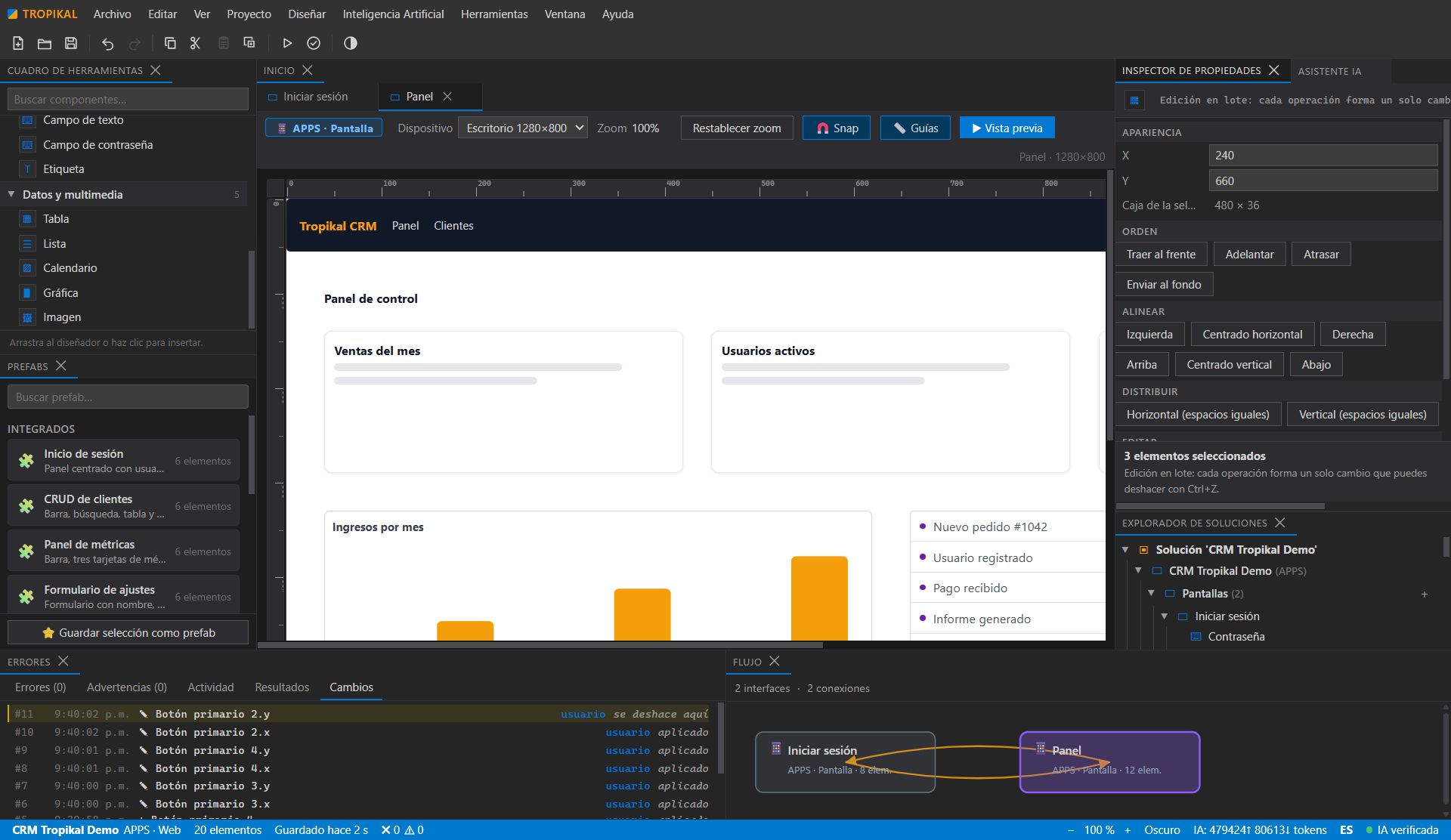
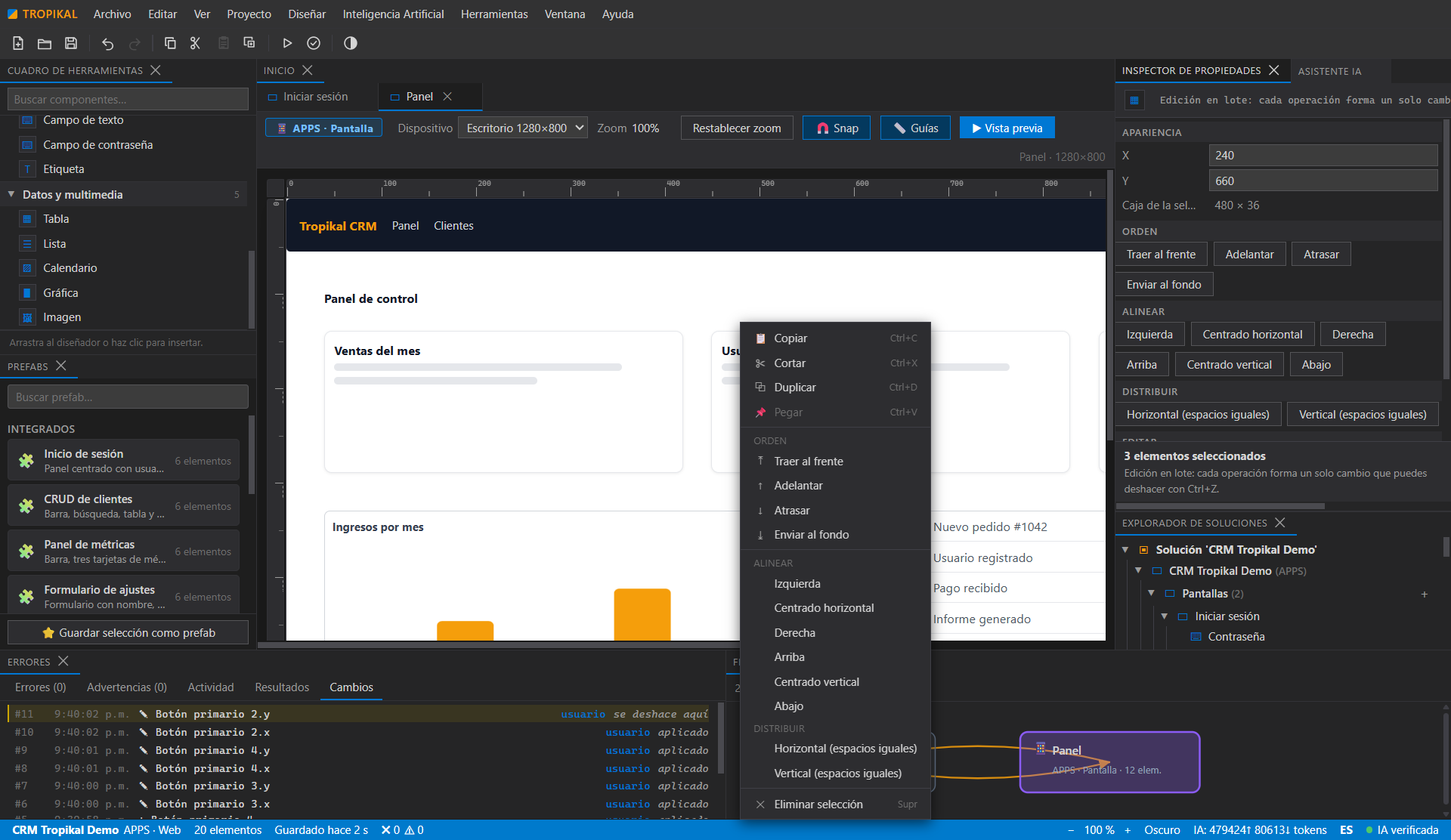
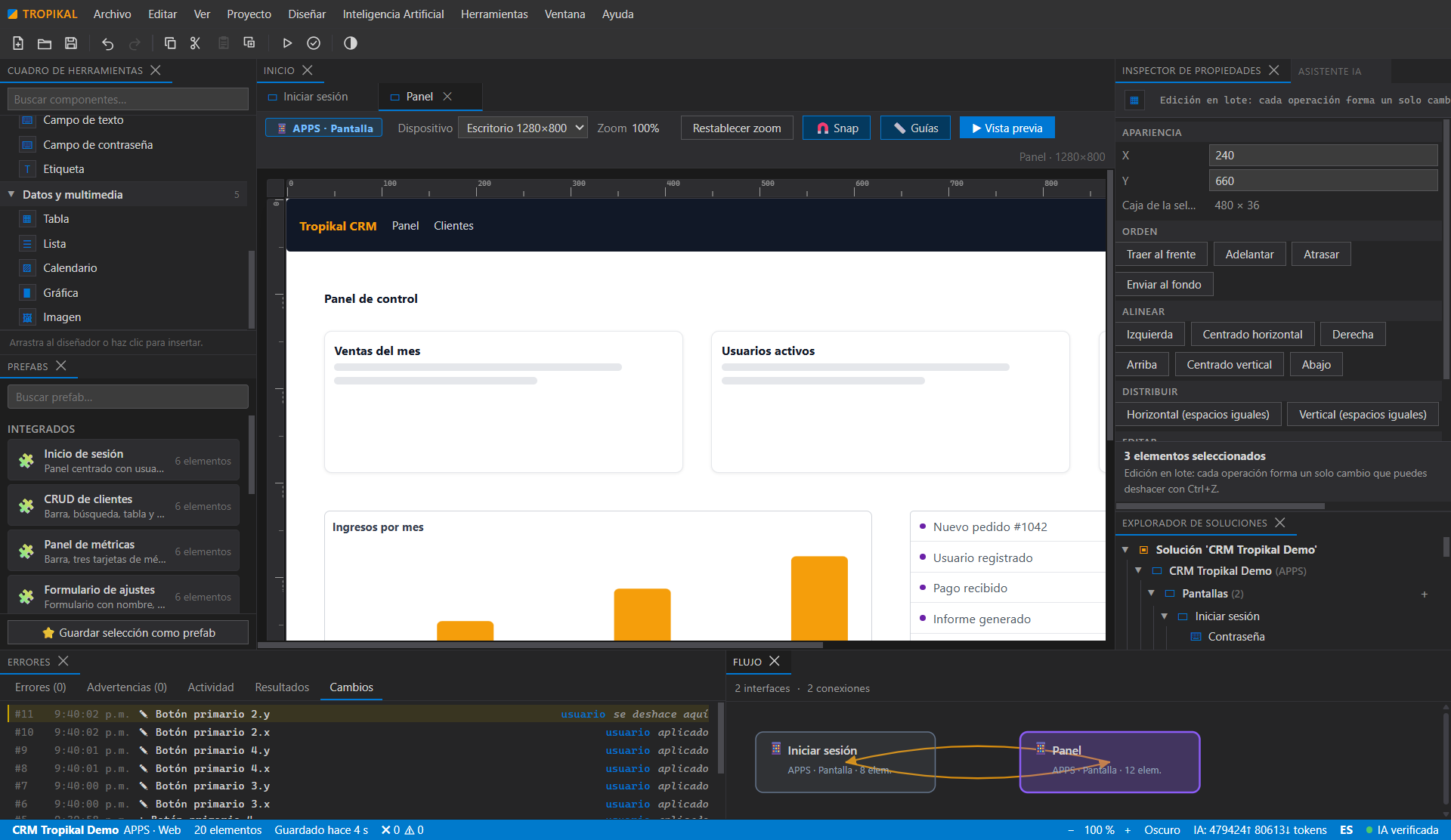
Selecciona varios elementos, alinea y distribuye, copia, corta, pega y duplica de a varios, y reordena el orden de pintado. Un solo Ctrl+Z revierte el lote completo.Multi-select elements, align and distribute, copy, cut, paste and duplicate in groups, and reorder painting. A single Ctrl+Z reverts the whole batch.
Manipulación directaDirect manipulation
Encuadra varios elementos arrastrando sobre el lienzo, ajusta posiciones al píxel con las flechas, usa el menú contextual en elementos, lienzo y árbol, y suelta imágenes desde el explorador de Windows para colocarlas en el diseño.Rubber-band multiple elements by dragging on the canvas, nudge to the pixel with the arrows, use the context menu on elements, canvas and tree, and drop images straight from Windows Explorer.
draw.io integradoBuilt-in draw.io
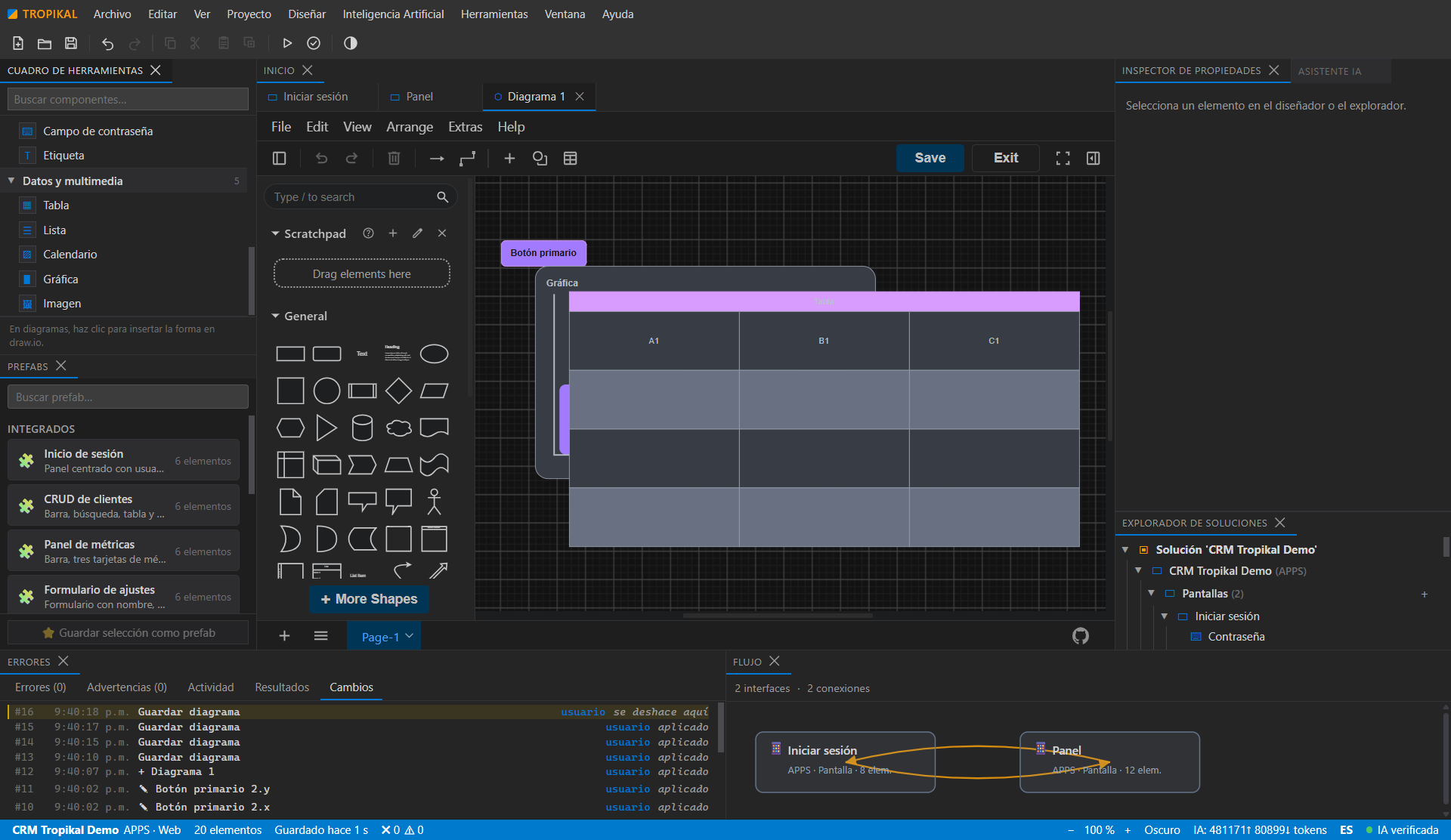
Diagrama procesos, lógica y datos sin salir del IDE. Los diagramas forman parte del modelo del proyecto.Diagram processes, logic and data without leaving the IDE. Diagrams are part of the project model.
Modelo semántico con procedenciaSemantic model with provenance
Cada elemento sabe quién lo creó: lo que tú definiste vs lo que la IA dedujo. Todo es revisable, editable y aprobable.Every element knows who created it: what you defined vs what the AI inferred. Everything is reviewable, editable and approvable.
IA multi-proveedor con aprobación humanaMulti-provider AI with human approval
Conecta el proveedor de IA que prefieras con tus propias claves. La IA propone; tú apruebas. Nada se aplica a ciegas.Connect your preferred AI provider with your own keys. AI proposes; you approve. Nothing is applied blindly.
Plantillas y niveles embarcadosBundled templates and levels
El estudio parte de niveles y plantillas ya hechos: los siembra como documentos editables y usted los ajusta a su idea.The studio starts from ready-made levels and templates: it seeds them as editable documents and you tune them to your idea.
Multiidioma es/enBilingual es/en
Interfaz y portal en español e inglés, con cambio instantáneo. Como este sitio.Interface and portal in Spanish and English, with instant switching. Like this site.
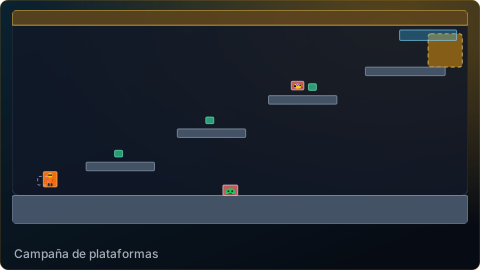
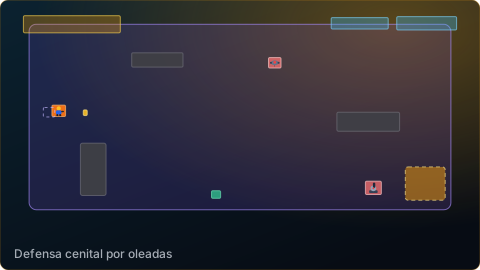
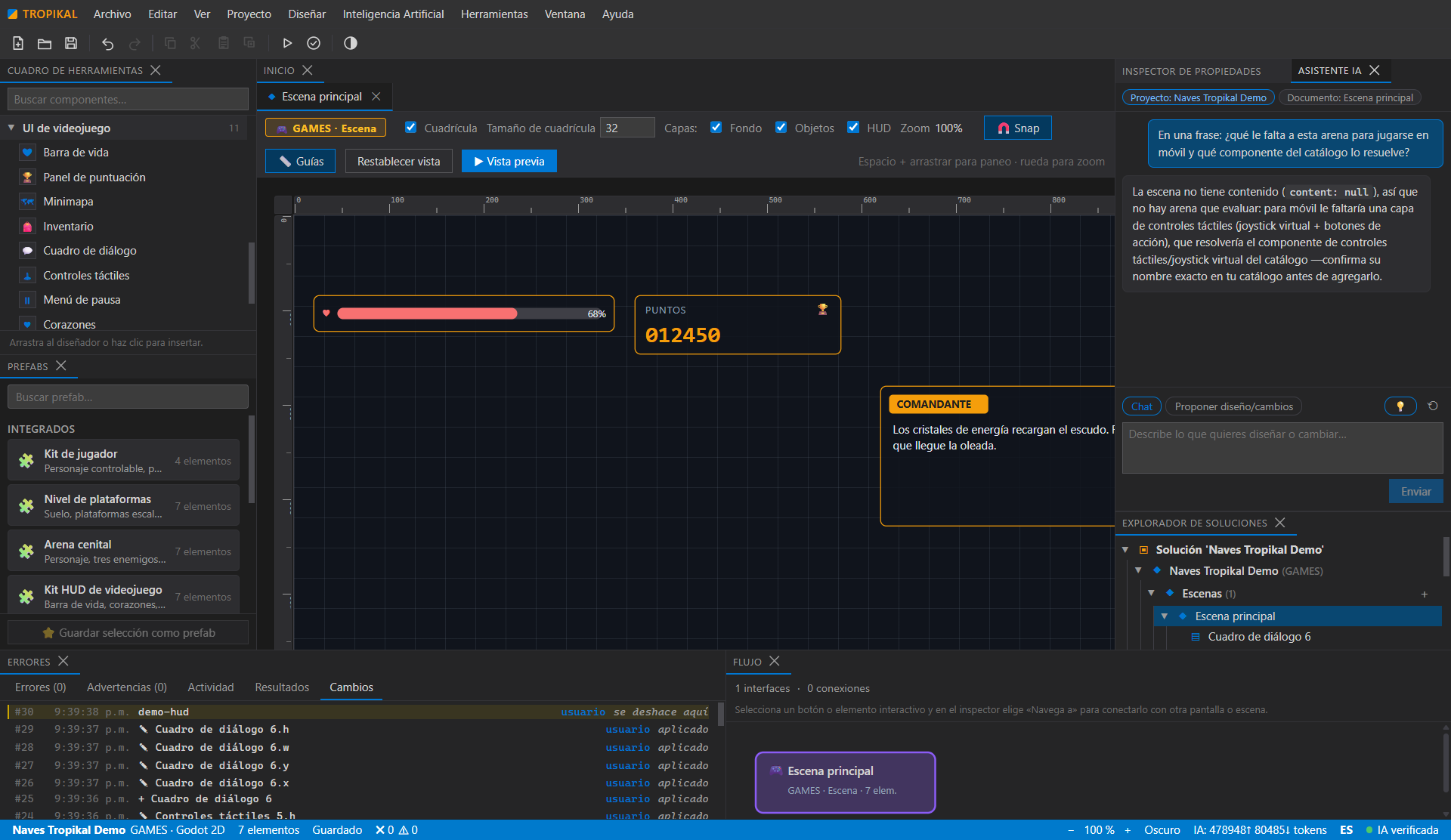
05Capturas reales de la 0.1.6Real screenshots of 0.1.6
Todas las imágenes son capturas de la aplicación compilada y publicada, no maquetas. Proyectos de demostración creados con el wizard de arranque. Every image is a screenshot of the compiled, published application — not a mockup. Demo projects created with the quick-start wizard.
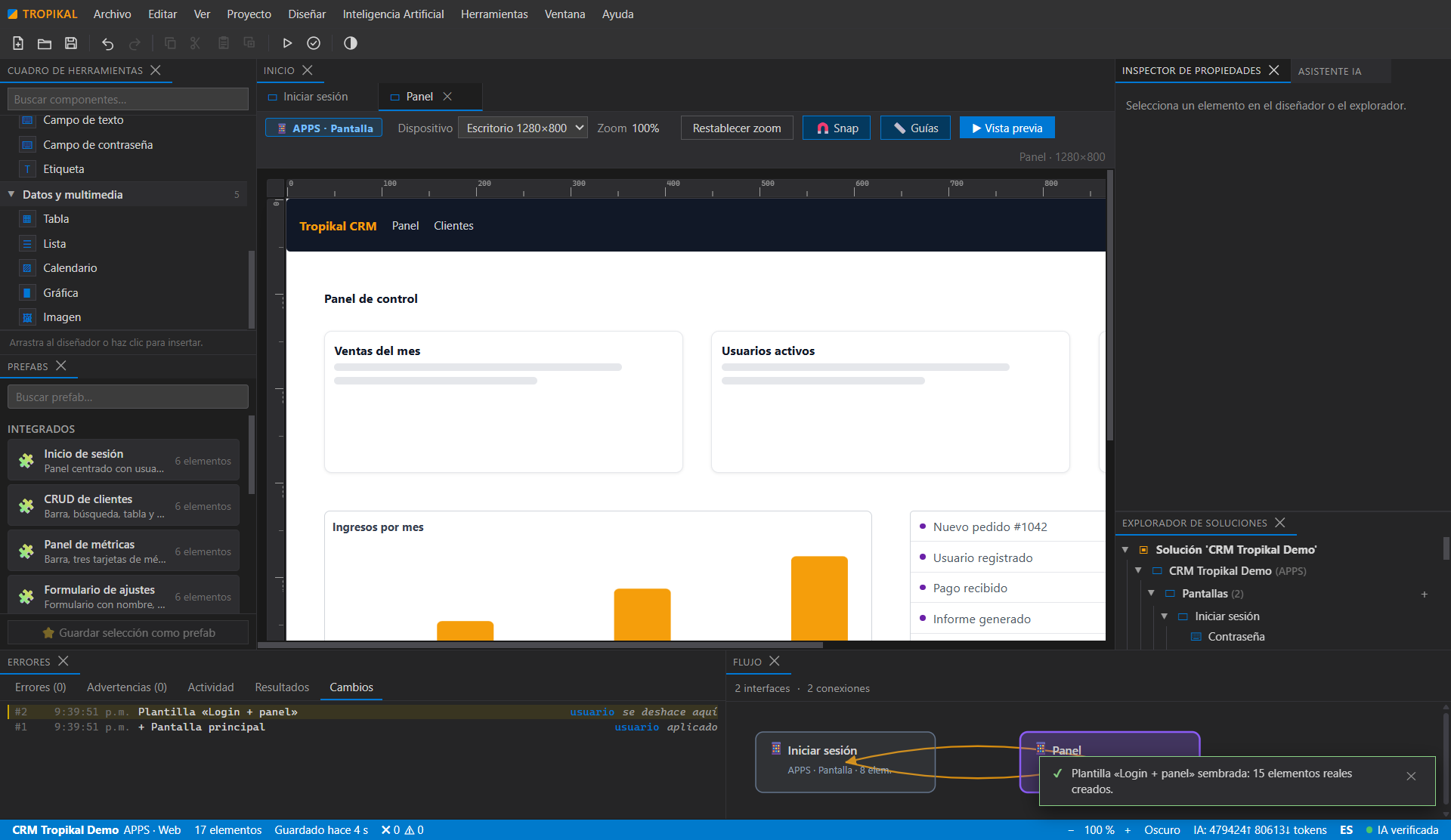
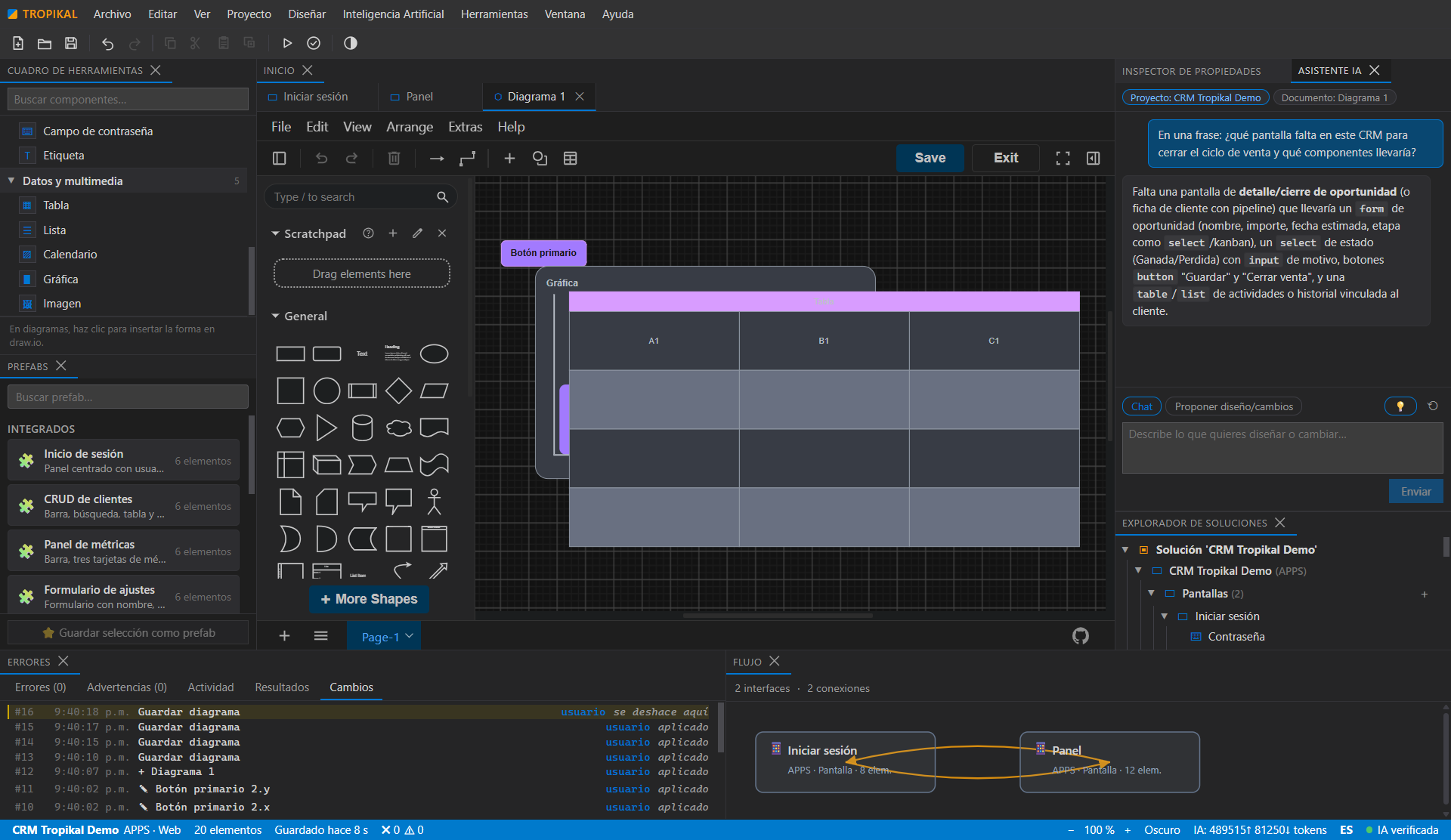
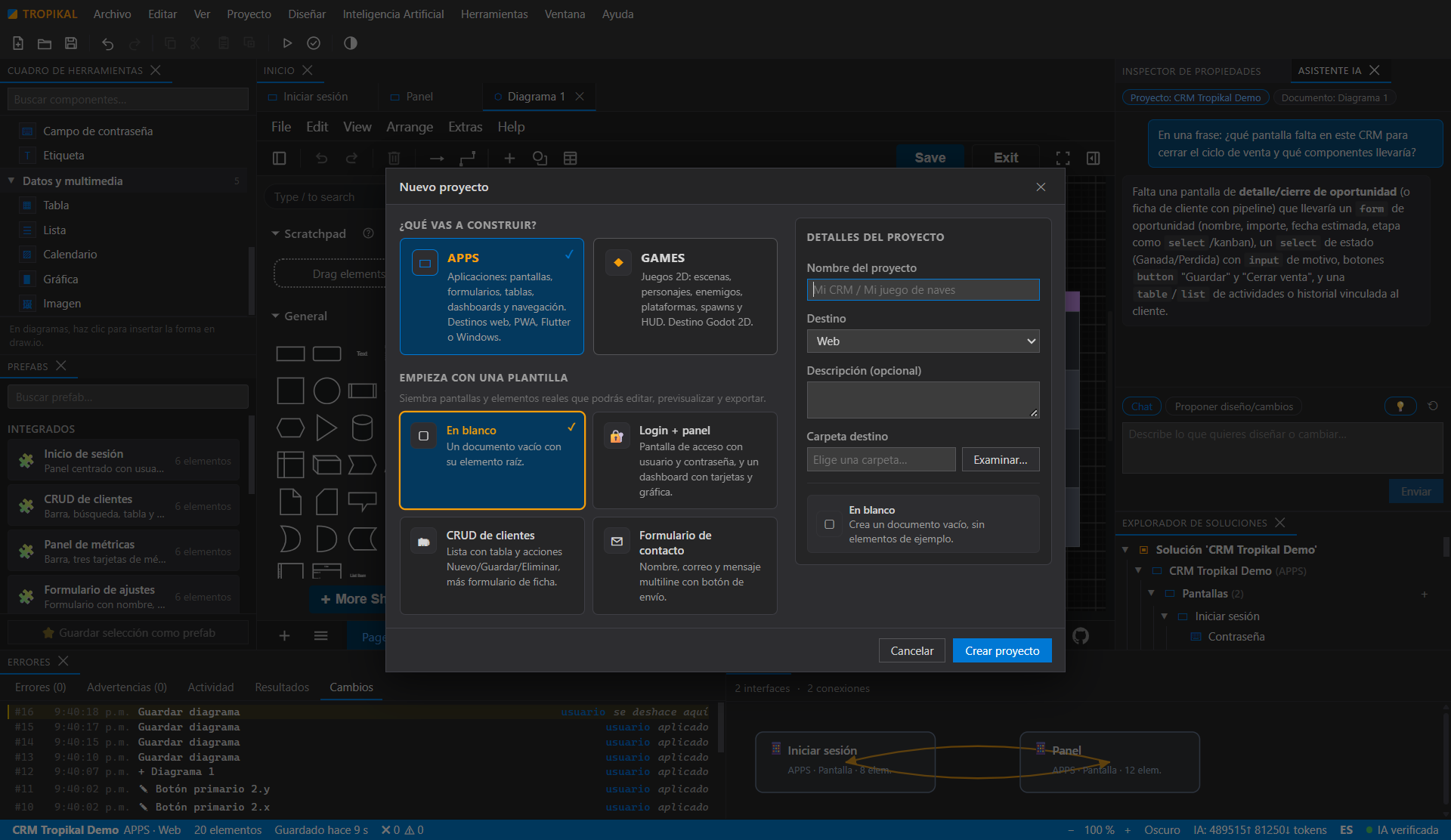
06PrecioPricing
Gratis durante la fase inicial.Free during the initial phase.
Sin tarjetas de pago, sin cuentas, sin suscripciones. Descarga el IDE y úsalo. Si más adelante hay planes de pago, se anunciarán aquí con claridad y lo ya publicado seguirá siendo tuyo.No credit cards, no accounts, no subscriptions. Download the IDE and use it. If paid plans come later, they will be announced here clearly, and what has already been released stays yours.
Nota: el uso de proveedores de IA externos puede tener costos propios del proveedor; tus claves y tu consumo son tuyos.Note: external AI providers may charge their own usage fees; your keys and your usage are yours.
07DescargarDownload
Consultando las descargas disponiblesChecking available downloads
Versión del portal: 0.1.24. Los enlaces, tamaños y huellas SHA-256 se cargan desde el manifiesto de publicación. Si no aparecen, recargue la página.Portal version: 0.1.24. Download links, sizes and SHA-256 hashes are loaded from the release manifest. If they do not appear, reload this page.
- IDE de escritorio para Windows con estudios APPS y GAMES.Windows desktop IDE with APPS and GAMES studios.
- Editor visual con draw.io integrado y modelo semántico con procedencia.Visual editor with built-in draw.io and a semantic model with provenance.
- Asistente de IA multi-proveedor con aprobación humana.Multi-provider AI assistant with human approval.
- Plantillas y niveles embarcados, e interfaz es/en.Bundled templates and levels, and es/en interface.
- Instalador .exe y versión portable .zip, con tamaño y SHA-256 publicados aquí..exe installer and portable .zip, with size and SHA-256 published here.
Descarga TROPIKAL STUDIODownload TROPIKAL STUDIO
Gratis. Windows 10/11 x64. Verifica el SHA-256 antes de instalar.Free. Windows 10/11 x64. Verify the SHA-256 before installing.
Transparencia: las capturas de este portal son imágenes reales de la versión 0.1.6 compilada y verificada end-to-end (34/34 pasos). Las imágenes se obtienen operando la app por DevTools, sin maquetas. La IA es real por streaming con tus propias claves; no usamos IA simulada ni cifras inventadas. Lo que aún no existe (generadores Flutter/Godot completos) se anuncia como previsto, no como hecho. Transparency: the screenshots on this portal are real images of version 0.1.6, compiled and verified end-to-end (34/34 steps). The images come from driving the app through DevTools, not from mockups. The AI is real streaming with your own keys; no fake AI demos, no made-up numbers. What does not exist yet (full Flutter/Godot generators) is announced as planned, not as done.